 Movie details →
Featured film · 2001 · French
Amélie
A shy Parisian turns small acts of kindness into a new way of seeing her own life.
 Movie details →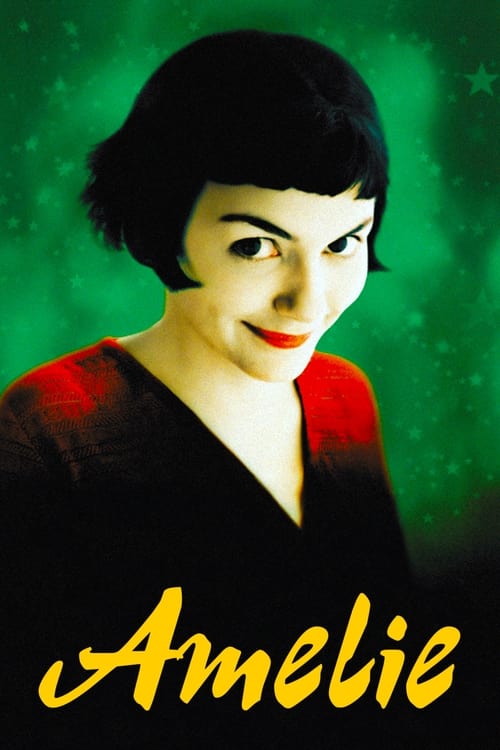
2001 · Movie

1950 · Movie

1954 · Movie

1994 · Movie

2001 · Movie

2025 · Movie

2025 · Movie

2025 · Movie

2025 · Movie

2025 · Movie

2022 · TV Series

2023 · TV Series

2023 · TV Series

2020 · TV Series

1989 · TV Series

2023 · TV Series

1999 · TV Series
1994 · Movie

2013 · TV Series

2020 · TV Series
Compare spoken audio, translated subtitles and captions before settling into a film.
Read guide →A practical way to compare original dialogue and translation without turning every film into homework.
Read guide →Find older films by release year, original name and the edition you want to watch.
Read guide →Search films, use My List and read subtitle help on a phone or tablet.
Read guide →FshareTV movies and subtitles
Some evenings begin with a movie name. Others begin with a language you want to hear, a scene you remember, or the feeling that an older film deserves another chance. FshareTV makes room for all of those beginnings. Find the production, read its premise, keep it in My List and choose how to continue watching.

People rarely remember a recommendation in exactly the form printed on a poster. An accent may be missing, punctuation may have changed, or a friend may use a translated name. Try the recognizable part of the title first. Searching Amelie without the accent can still find Amélie, and an original title can help when an English name is too broad. The catalog searches production names rather than asking you to reproduce a full website address.
Keep the format in mind. A movie and a television series may share a word, franchise or even a complete name. Selecting Movies removes series from the results, while TV Shows does the reverse. If a correct title appears to be missing, return that selector to both formats. Likewise, clear a year you only half remember. The date of a trailer, an award or your first viewing is not necessarily the production’s release year.
The sort control helps once you have a workable set of results. Alphabetical order makes a known name easier to scan. Release order is useful for choosing between older and newer films, and rating order offers a different starting point when nothing is familiar. None of those arrangements can know your mood better than you do. Read the premise before treating a higher position as a personal recommendation. Use Reset when you want to remove the accumulated choices rather than undoing each filter separately.
Our featured film begins with a young woman whose attention to other people becomes a way of avoiding her own uncertainty. Amélie is a useful example of why a movie can reward more than one kind of viewing. You might first follow the romantic story, then return for the gestures, background details and phrasing that were easy to miss. You do not have to understand every spoken word to recognize an expression or a moment of hesitation.
The record keeps the 2001 release year beside the French original title, Le Fabuleux Destin d’Amélie Poulain. Those details are useful when an app shortens the name or uses a different poster. They also keep a translated title from being confused with another production. Open the Amélie details for its premise and viewing choices, or save it if you want to return after browsing other French-language films.
A subtitle track can make the story accessible without replacing the sound of the original performance. For a first watch, choose the language combination that lets you relax into the film. For a later visit, you might concentrate on one brief exchange and compare what you hear with the text. The goal need not be to turn the entire feature into an exercise. Sometimes noticing one line more clearly is enough to make an already familiar scene feel fresh.
Rashomon and Seven Samurai appear together often enough that someone new to Japanese cinema might treat them as interchangeable recommendations. They are not. Rashomon, listed here with its 1950 release, invites attention to different accounts of an event. Seven Samurai, released in 1954, develops its story around a threatened community and the people recruited to defend it. One recommendation may fit a curiosity about testimony and memory; the other may appeal through group dynamics and an unfolding confrontation.
Read the Rashomon and Seven Samurai premises separately. You do not need an essay on their reputations before choosing. Notice the kind of situation each presents and whether you have the attention for it. Keep subtitle readability in mind too. A film with unfamiliar names and social relationships is easier to follow when the text is comfortably visible from the start.
When comparing editions, do not assume black bars mean an incomplete picture. Older films can have a different intended frame shape from a modern television. Stretching the image to fill the screen may change faces and compositions. A high-resolution restoration can still preserve a narrower frame. Select the version that presents the film clearly, and avoid using a full-screen appearance as the only test of quality. That principle matters as much for animation as it does for live action.
An animated poster can suggest warmth or spectacle, but it does not tell you who the story is appropriate for. The medium accommodates gentle adventures, adult themes, psychological tension and long-running fantasy. Read the premise and the viewing service’s content information before choosing for children or a mixed group. The animation category is a way to find the form you enjoy, not a promise that every item belongs in the same family evening.
In our animated-movie collection, a feature has its own production record. A television adaptation or a related franchise story is a separate choice. Keep that distinction when moving between search results. Spirited Away and My Neighbor Totoro can be approached as individual films; a long-running series requires a different decision about where to begin. The presence of familiar character artwork does not by itself establish the correct episode or installment.
Audio choices can also change the experience. You may prefer an original performance with translated subtitles, or a dubbed track that lets you spend more time looking at the animation. Neither preference needs to be defended to use the catalog. What matters is checking the edition that actually offers your combination. A Japanese production-language label describes the original work. It does not certify every dubbed track, caption language or audio option on every viewing service.
A broad genre becomes more useful when you connect it to a specific preference. For comedy, you might want fast exchanges, awkward social situations or a gentler character story. For romance, you may be looking for a playful beginning rather than a difficult separation. For a mystery, the attraction may be a confined setting or a case with several competing explanations. Reading the setup helps distinguish those experiences before the opening scene.
The romantic-comedy collection brings the two genres together rather than assuming every romance is light. The crime-and-mystery collection narrows a different intersection. These are shortcuts into the existing catalog. You can still switch to a broader genre if the combined collection feels too specific, or inspect the original language when you want to hear a particular style of dialogue.
For a shared viewing, settle one meaningful preference before comparing posters. A group can often agree on avoiding intense horror or on wanting a complete feature rather than starting a series. Save two or three plausible candidates and read their short premises together. A shortlist with genuinely different choices is easier to discuss than a dozen nearly identical possibilities. My List can hold those candidates while you check which edition fits the people and screens involved.
Queries such as FshareTV com English or FshareTV vn often describe how someone remembers entering the site, rather than the language of the movie itself. This catalog uses English navigation and descriptions. Its original-language pages remain useful whether your next film is spoken in English or not. They do not imply a fully translated website interface or guarantee Vietnamese subtitles across the catalog.
If you are looking for a film with Vietnamese subtitles, carry that requirement into the viewing selection. Look for the language explicitly in the subtitle menu or offer details. The address of a website is not enough to establish that a particular episode contains it. The same applies to English subtitles for a Korean or Japanese title: confirm the written track as well as the spoken one, especially when more than one edition appears.
For recommendations across languages, share the production name, original name when helpful, and release year. Add the type of language support you used rather than describing a whole website as English or Vietnamese. A friend can then search for the same film and choose a suitable edition in their own region. This small amount of context is more durable than a screenshot of a play button or an old link whose title has been cut off.
Watching with two languages can be an enjoyable way to notice how a sentence works in context. A translated line helps establish the meaning, while original-language captions may help you connect speech to written words. A compatible dual-subtitle player can show both at once. If the player you use does not support that arrangement, two short passes through the same scene can serve a similar practical purpose: first understand the exchange, then listen more closely.
Choose a scene with a situation you can recognize. Someone ordering food, asking a favor or greeting a neighbor gives you visual context. A dense explanation full of invented names may be interesting but difficult to use as a starting point. You are free to enjoy that scene simply as part of the film. Our bilingual-viewing guide suggests a flexible approach rather than prescribing a lesson or promising a learning result.
Keep notes selective. Write down an expression because you want to remember it, not because every unfamiliar word must be captured. Include the situation and tone if they matter. A phrase delivered sarcastically may mean something different from its literal translation. Stop replaying when repetition begins to distract from the story. There is no requirement to transform an evening’s entertainment into a vocabulary session, and choosing comfortable translated subtitles is always a reasonable way to watch.
A written line has limited time and space to communicate what is happening. Subtitles may condense a sentence, rearrange an expression or leave out a repetition that makes sense in speech. That does not automatically mean the translation is wrong. It may be an attempt to preserve the meaning while remaining readable before the next exchange. If you are comparing audio and text, pay attention to the whole thought instead of looking for a separate written equivalent of every sound.
Dubbing creates another reason for differences. A dubbed performance may use wording that fits the scene’s timing differently from the subtitle translation. Selecting English audio and English subtitles does not guarantee identical scripts. For closer listening, look for captions intended for the particular spoken track where they are available. If no matching track exists, use the text for meaning and accept that its phrasing may diverge.
Names, jokes, idioms and levels of politeness can be especially revealing. A translation may choose an equivalent effect rather than a literal phrase. Avoid treating one subtitle line as a complete explanation of how people ordinarily speak. The scene, relationship and delivery provide information too. That is part of the pleasure of returning to a film: what first seemed like a simple exchange can become more interesting when you notice how much the words leave unsaid.
A constant offset is different from timing drift. If subtitles begin correctly but become increasingly late, moving every line by the same amount may fix one moment while breaking another. If the mismatch suddenly changes after an inserted scene, the subtitle file may have been prepared for a different cut. Television recaps, opening sequences and special editions can create similar differences. A track can be perfectly readable and still belong to the wrong timeline.
Compare another clear line later in the film before settling on a large adjustment. If the required value is nearly the same, a single offset may be useful. If the values differ substantially, look for a track matching the particular release or episode. Do not keep adding delay simply because the control is available. The practical question is whether the text belongs to what is actually on screen.
Keep the production and edition identifiable while troubleshooting. Write down the movie year, episode number and any version label you can see. An unrelated subtitle for a similarly named film will never become correct through timing alone. Our calculator deliberately handles the narrow task it can do well: estimating an earlier or later shift for one matching line. Translation, scene changes and frame-rate conversion are separate problems that may need a different track or a capable subtitle editor.
A picture can contain many pixels and still be difficult to watch. Compression, the source material, display settings and a changing connection all affect what you see. HD commonly describes formats such as 720p, while 1080p offers more image detail when the source and screen can make use of it. Selected 4K editions can go further, but a catalog poster does not prove that any particular viewing offer supplies that format.
Check the actual edition before choosing a plan or device setting around it. A restored older film may look different from a recent digitally photographed production even at the same resolution. Grain can be part of the image rather than a sign that it is broken. Likewise, a narrow frame may be intentional. Avoid changing several television settings at once in an attempt to make every film resemble the same kind of polished video.
For subtitles, a steady picture and readable text are usually more valuable than a resolution that repeatedly stalls. If the selected player supports adaptive bitrate, an automatic setting may balance quality with the connection as it changes. You can inspect a still moment and a scene with movement before making a decision. Our HD and quality guide keeps those choices separate from the film’s rating, original language and release date.
A viewing session can involve several different pages. You browse the film here, compare an offer after following the viewing link, and watch inside the chosen service. Those steps may be handled by different systems. If a video stalls after you leave the catalog, repeatedly refreshing FshareTV will not change the player that is delivering it. Identify where the problem appears before trying a fix.
Terms such as streaming servers and CDN delivery describe parts of how a service can distribute media. They are not controls that this catalog asks you to configure. A service may select a delivery location or bitrate automatically. If it offers a server selector, use its own explanation of the choices instead of assuming the highest number means the best source. There is no independent server-switching system implemented on these title pages.
Fast loading is also affected by the device and connection you are using. A title’s text may be ready while its poster is still arriving. The title name and viewing link remain useful even when artwork takes longer. When a page repeatedly fails, compare another page and one other ordinary website to narrow the issue. That simple distinction is more informative than changing browser settings at random or concluding that a single delayed image means an entire service has disappeared.
A larger screen changes more than the apparent size of a poster. Text that was easy to read at arm’s length may be too small across a room. Before starting a subtitled film on a Smart TV, test a few lines from the seat you will use. If the chosen app offers caption styling, choose a size and background that remain comfortable in bright and dark scenes. Do not assume a phone’s subtitle setting automatically carries over.
A desktop or tablet can be a useful place to compare titles before continuing on a television. Keep the movie name and year visible, then open the corresponding title in the viewing app available on the bigger screen. Casting requires compatible devices and support from that service. A console may provide another route through its supported entertainment apps, but the presence of a web browser alone does not establish full playback compatibility.
The catalog remains useful even when you use different devices for browsing and watching. Save the film here as a reminder, and keep episode progress in the actual viewing application. If you move between services or devices, note the timestamp before leaving. FshareTV does not claim to control television apps, transfer an external player session or synchronize the position of a film across unrelated platforms.
HTML5 video technology allows browsers to present media without the old plugin-based approach, but it does not make every video interface identical. Keyboard shortcuts, Picture-in-Picture, playback speed and subtitle controls are implemented differently by different services. Check the player’s own settings or help rather than assuming that a familiar key will have the same effect everywhere. A shortcut used while a search field is focused may simply type into that field.
Picture-in-Picture can be convenient when you want a small floating video window, but subtitle display in that mode may differ from the main player. Test it with a line of dialogue before relying on it for an entire foreign-language film. Playback speed can help with a short repeat, although changing it may affect how a performance feels. A slower setting is not automatically the best way to understand an exchange; replaying one scene at normal speed may be more useful.
The same practical approach applies to full-screen controls and subtitle customization. Try the function you need, check the result and return to the simplest arrangement that works. These are viewing choices to inspect in the selected player. They are not hidden features of the FshareTV catalog, and our subtitle calculator does not create them in another service.
A saved list is most useful when it reflects something you might actually watch. Add a film because its premise interests you or because you want to compare it with another choice. A title-page button shows when the production is already in My List. Returning to the list gives you a compact selection of those productions rather than asking you to reconstruct every search that led to them.
You can use it for a shared evening, a small sequence of older movies or a language you want to hear more often. Try keeping the next few plausible choices instead of treating the list as an obligation to watch everything eventually. If one film no longer appeals, its button lets you remove that individual selection. The list is a convenience, not a measure of how serious you are about movies.
Saved entries stay in this browser on this device. Clearing the website’s stored data can remove them, and private browsing may not retain them after the session ends. There is no account-based backup or cross-device synchronization. If a choice matters beyond this session, keep the title and year somewhere you control as well. A saved production is not a downloaded video, and it does not reserve an external viewing offer or keep that offer available indefinitely.
A series record is a starting point, not a complete description of where you left off. A recommendation may refer to the whole show, one season or a special episode. Search the series name first, then keep the season, number and episode name with your viewing choice. This is especially useful when different applications group specials or recaps differently.
Our TV-series catalog sits beside the movie catalog but labels the format clearly. A show’s premiere year remains attached to the series even when later seasons arrive years afterward. If you search using the year of a later season, an exact year filter may hide the record you wanted. Clear that filter and compare the premise before assuming the series has been removed.
Subtitle preparation matters across episodes too. A track that fits one installment may not fit the next, and a recap can shift the timing relative to another edition. When resuming in a different app, check one recognizable scene before relying on a remembered timestamp. My List remembers the production here; the viewing app manages its own episode progress. Keeping those roles clear prevents a saved poster from being mistaken for a promise to resume at the exact second you stopped.
If a service supports offline viewing, preparation is easier while you still have time to correct a problem. Confirm that the download has finished, not merely entered a queue. Open it once and check the audio and subtitle tracks you intended to use. A downloaded episode may not carry every track available during streaming, and a setting chosen for one film may not apply to the next.
Choose a download quality that fits your actual screen and storage. A larger file is not automatically the right choice for a short trip with several episodes to carry. Check any access window or renewal condition displayed by the service. If the app requires a connection before a long period away, finding that out before departure is more useful than discovering it when the film will not open.
A downloaded subtitle file contains text and timing, not the movie itself. Likewise, adding FshareTV to a home screen creates an access point to the catalog rather than an offline collection. Keeping these objects distinct avoids the disappointment of opening a saved poster while expecting a playable video. Save the title here for organization, and use the supported viewing application for any actual offline media.
Begin with the symptom you can actually see. An empty search, an image that will not load and a stalled external player are three different problems. For an empty result, remove a filter or shorten the title. For missing artwork, compare another title and reload once. If the catalog opens normally but the service playing the film fails, troubleshoot that service rather than restarting your search from the beginning.
A viewing button may open a separate tab. Check whether the browser blocked that action before assuming nothing happened. Follow the visible link if necessary and compare the title and year in the destination results. If you see offers for the wrong region, return to the country selector here and choose where you intend to watch. The country preference changes the destination region, not the original language of the production.
For subtitle problems, decide whether the text is unreadable, incorrectly translated or out of time. Size and contrast address readability. A different language or track may address an unsuitable translation. The timing calculator helps with a consistent offset, but not with a different cut. The troubleshooting page organizes these practical steps so you can make one relevant change instead of losing your place while changing everything at once.
Looking for sites like FshareTV is more productive when you know which part of the experience you want to replace. You may need an older title, a specific language track, a particular season or a service that works on your television. Carry that requirement into the next search. A familiar-looking homepage is not enough if it leads to a different production or an edition you cannot follow comfortably.
A FshareTV Reddit discussion or review can introduce a useful recommendation. Treat it as a lead rather than a current availability feed. The author may be describing another country, an older interface or a subtitle track that has since changed. Keep the title and the useful observation, then compare the offer currently shown. There is no need to repeat an old domain claim simply because it once helped somebody else.
Our alternatives guide focuses on those comparisons. If your main interest is language, inspect the spoken and written tracks. If it is older cinema, compare the production year and edition. If it is convenience, check the supported devices and access terms. An alternative is successful when it helps you watch the same film in a way that suits you, not merely when its name resembles the site you started from.
Catalogs are useful because they reduce the work of finding something, but browsing can become an evening of its own. When you have two good choices, read their premises and select the one that fits the attention you have now. Save the other. You do not need to settle every question about every edition before deciding which story interests you.
FshareTV brings older films, contemporary titles, original-language browsing and practical subtitle help into that decision. Use the search when you know a name, use collections when you know a preference, and use the guides when a specific detail is getting in the way. A memorable movie may come from a familiar director, an unfamiliar language or an ordinary recommendation you nearly forgot.
Once the picture and words are comfortable, give the film some room. Notice the performance, the pause before an answer or the background action you missed on an earlier visit. The tools should support that attention rather than compete with it. The next worthwhile choice is not always the biggest poster or the newest release. Sometimes it is the film you already had a reason to save.